Soporte > FJD GM22S
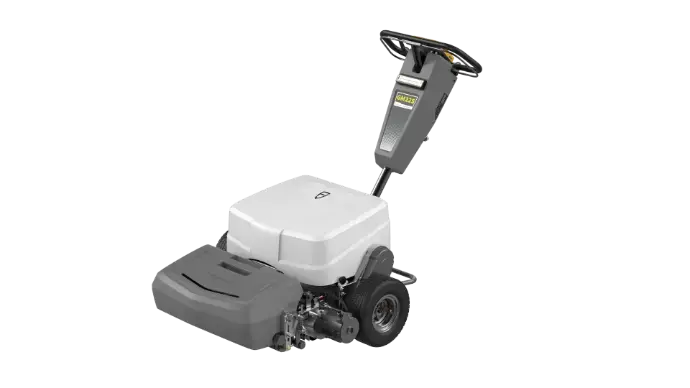
Folleto
Inglés
Portugués
Japonés
Cargador inalámbrico
Chino
Ruso
Otro
Configurar un campo de fútbol con solo dos esquinas
Configurar un campo de fútbol con solo dos esquinas
Configurar un campo de fútbol con solo dos esquinas
Configurar un campo de fútbol con solo dos esquinas
Configurar un campo de fútbol con solo dos esquinas
Configurar un campo de fútbol con solo dos esquinas
Configurar un campo de fútbol con solo dos esquinas
Configurar un campo de fútbol con solo dos esquinas
Configurar un campo de fútbol con solo dos esquinas
Configurar un campo de fútbol con solo dos esquinas
Configurar un campo de fútbol con solo dos esquinas
Configurar un campo de fútbol con solo dos esquinas
Configurar un campo de fútbol con solo dos esquinas
Configurar un campo de fútbol con solo dos esquinas
Configurar un campo de fútbol con solo dos esquinas
Configurar un campo de fútbol con solo dos esquinas
Configurar un campo de fútbol con solo dos esquinas
Configurar un campo de fútbol con solo dos esquinas
Configurar un campo de fútbol con solo dos esquinas
Configurar un campo de fútbol con solo dos esquinas
Configurar un campo de fútbol con solo dos esquinas
Configurar un campo de fútbol con solo dos esquinas
Configurar un campo de fútbol con solo dos esquinas
Configurar un campo de fútbol con solo dos esquinas
Configurar un campo de fútbol con solo dos esquinas
Configurar un campo de fútbol con solo dos esquinas
Configurar un campo de fútbol con solo dos esquinas
Configurar un campo de fútbol con solo dos esquinas
Configurar un campo de fútbol con solo dos esquinas
Configurar un campo de fútbol con solo dos esquinas
Configurar un campo de fútbol con solo dos esquinas
Configurar un campo de fútbol con solo dos esquinas
Configurar un campo de fútbol con solo dos esquinas
Configurar un campo de fútbol con solo dos esquinas
Configurar un campo de fútbol con solo dos esquinas
Configurar un campo de fútbol con solo dos esquinas
Inglés
Portugués
Japonés
Cargador inalámbrico
Chino
Ruso
Otro
Configurar un campo de fútbol con solo dos esquinas
Configurar un campo de fútbol con solo dos esquinas
Configurar un campo de fútbol con solo dos esquinas
Configurar un campo de fútbol con solo dos esquinas
Configurar un campo de fútbol con solo dos esquinas
Configurar un campo de fútbol con solo dos esquinas
Configurar un campo de fútbol con solo dos esquinas
Configurar un campo de fútbol con solo dos esquinas
Configurar un campo de fútbol con solo dos esquinas
Configurar un campo de fútbol con solo dos esquinas
Configurar un campo de fútbol con solo dos esquinas
Configurar un campo de fútbol con solo dos esquinas
Configurar un campo de fútbol con solo dos esquinas
Configurar un campo de fútbol con solo dos esquinas
Configurar un campo de fútbol con solo dos esquinas
Configurar un campo de fútbol con solo dos esquinas
Configurar un campo de fútbol con solo dos esquinas
Configurar un campo de fútbol con solo dos esquinas
Configurar un campo de fútbol con solo dos esquinas
Configurar un campo de fútbol con solo dos esquinas
Configurar un campo de fútbol con solo dos esquinas
Configurar un campo de fútbol con solo dos esquinas
Configurar un campo de fútbol con solo dos esquinas
Configurar un campo de fútbol con solo dos esquinas
Configurar un campo de fútbol con solo dos esquinas
Configurar un campo de fútbol con solo dos esquinas
Configurar un campo de fútbol con solo dos esquinas
Configurar un campo de fútbol con solo dos esquinas
Configurar un campo de fútbol con solo dos esquinas
Configurar un campo de fútbol con solo dos esquinas
Configurar un campo de fútbol con solo dos esquinas
Configurar un campo de fútbol con solo dos esquinas
Configurar un campo de fútbol con solo dos esquinas
Configurar un campo de fútbol con solo dos esquinas
Configurar un campo de fútbol con solo dos esquinas
Configurar un campo de fútbol con solo dos esquinas
Inglés
Portugués
Japonés
Cargador inalámbrico
Chino
Ruso
Otro
Configurar un campo de fútbol con solo dos esquinas
Configurar un campo de fútbol con solo dos esquinas
Configurar un campo de fútbol con solo dos esquinas
Configurar un campo de fútbol con solo dos esquinas
Configurar un campo de fútbol con solo dos esquinas
Configurar un campo de fútbol con solo dos esquinas
Configurar un campo de fútbol con solo dos esquinas
Configurar un campo de fútbol con solo dos esquinas
Configurar un campo de fútbol con solo dos esquinas
Configurar un campo de fútbol con solo dos esquinas
Configurar un campo de fútbol con solo dos esquinas
Configurar un campo de fútbol con solo dos esquinas
Configurar un campo de fútbol con solo dos esquinas
Configurar un campo de fútbol con solo dos esquinas
Configurar un campo de fútbol con solo dos esquinas
Configurar un campo de fútbol con solo dos esquinas
Configurar un campo de fútbol con solo dos esquinas
Configurar un campo de fútbol con solo dos esquinas
Configurar un campo de fútbol con solo dos esquinas
Configurar un campo de fútbol con solo dos esquinas
Configurar un campo de fútbol con solo dos esquinas
Configurar un campo de fútbol con solo dos esquinas
Configurar un campo de fútbol con solo dos esquinas
Configurar un campo de fútbol con solo dos esquinas
Configurar un campo de fútbol con solo dos esquinas
Configurar un campo de fútbol con solo dos esquinas
Configurar un campo de fútbol con solo dos esquinas
Configurar un campo de fútbol con solo dos esquinas
Configurar un campo de fútbol con solo dos esquinas
Configurar un campo de fútbol con solo dos esquinas
Configurar un campo de fútbol con solo dos esquinas
Configurar un campo de fútbol con solo dos esquinas
Configurar un campo de fútbol con solo dos esquinas
Configurar un campo de fútbol con solo dos esquinas
Configurar un campo de fútbol con solo dos esquinas
Configurar un campo de fútbol con solo dos esquinas
Configurar un campo de fútbol con solo dos esquinas
Configurar un campo de fútbol con solo dos esquinas
Configurar un campo de fútbol con solo dos esquinas
Configurar un campo de fútbol con solo dos esquinas
Configurar un campo de fútbol con solo dos esquinas
Configurar un campo de fútbol con solo dos esquinas
Configurar un campo de fútbol con solo dos esquinas
Configurar un campo de fútbol con solo dos esquinas
Configurar un campo de fútbol con solo dos esquinas
Configurar un campo de fútbol con solo dos esquinas
Configurar un campo de fútbol con solo dos esquinas
Configurar un campo de fútbol con solo dos esquinas
Configurar un campo de fútbol con solo dos esquinas
Configurar un campo de fútbol con solo dos esquinas
Configurar un campo de fútbol con solo dos esquinas
Configurar un campo de fútbol con solo dos esquinas
Configurar un campo de fútbol con solo dos esquinas
Configurar un campo de fútbol con solo dos esquinas
Configurar un campo de fútbol con solo dos esquinas
Configurar un campo de fútbol con solo dos esquinas
Configurar un campo de fútbol con solo dos esquinas
Configurar un campo de fútbol con solo dos esquinas
Configurar un campo de fútbol con solo dos esquinas
Configurar un campo de fútbol con solo dos esquinas
Configurar un campo de fútbol con solo dos esquinas
Configurar un campo de fútbol con solo dos esquinas
Configurar un campo de fútbol con solo dos esquinas
Configurar un campo de fútbol con solo dos esquinas
Configurar un campo de fútbol con solo dos esquinas
Configurar un campo de fútbol con solo dos esquinas
Configurar un campo de fútbol con solo dos esquinas
Configurar un campo de fútbol con solo dos esquinas
Configurar un campo de fútbol con solo dos esquinas
Configurar un campo de fútbol con solo dos esquinas
Configurar un campo de fútbol con solo dos esquinas
Configurar un campo de fútbol con solo dos esquinas
¿Cómo configuro una estación base?
1.Confirme que se ha tendido la línea de delimitación: Asegúrese de que la línea de delimitación del área de trabajo designada para el robot (normalmente cables enterrados bajo tierra o fijados al suelo) se haya instalado correctamente y esté encendida.
2.Limpieza del césped: Antes de empezar por primera vez, retire piedras, ramas, juguetes y otros residuos del césped para evitar daños en la máquina o atascos.
3.Compruebe el cuerpo: Asegúrese de que el robot no esté significativamente dañado y de que las cuchillas estén instaladas de forma segura (si se utiliza por primera vez).
¿Cómo configuro una estación base?
1.Confirme que se ha tendido la línea de delimitación: Asegúrese de que la línea de delimitación del área de trabajo designada para el robot (normalmente cables enterrados bajo tierra o fijados al suelo) se haya instalado correctamente y esté encendida.
2.Limpieza del césped: Antes de empezar por primera vez, retire piedras, ramas, juguetes y otros residuos del césped para evitar daños en la máquina o atascos.
3.Compruebe el cuerpo: Asegúrese de que el robot no esté significativamente dañado y de que las cuchillas estén instaladas de forma segura (si se utiliza por primera vez).
¿Cómo configuro una estación base?
1.Confirme que se ha tendido la línea de delimitación: Asegúrese de que la línea de delimitación del área de trabajo designada para el robot (normalmente cables enterrados bajo tierra o fijados al suelo) se haya instalado correctamente y esté encendida.
2.Limpieza del césped: Antes de empezar por primera vez, retire piedras, ramas, juguetes y otros residuos del césped para evitar daños en la máquina o atascos.
3.Compruebe el cuerpo: Asegúrese de que el robot no esté significativamente dañado y de que las cuchillas estén instaladas de forma segura (si se utiliza por primera vez).
¿Cómo configuro una estación base?
1.Confirme que se ha tendido la línea de delimitación: Asegúrese de que la línea de delimitación del área de trabajo designada para el robot (normalmente cables enterrados bajo tierra o fijados al suelo) se haya instalado correctamente y esté encendida.
2.Limpieza del césped: Antes de empezar por primera vez, retire piedras, ramas, juguetes y otros residuos del césped para evitar daños en la máquina o atascos.
3.Compruebe el cuerpo: Asegúrese de que el robot no esté significativamente dañado y de que las cuchillas estén instaladas de forma segura (si se utiliza por primera vez).
¿Cómo configuro una estación base?
1.Confirme que se ha tendido la línea de delimitación: Asegúrese de que la línea de delimitación del área de trabajo designada para el robot (normalmente cables enterrados bajo tierra o fijados al suelo) se haya instalado correctamente y esté encendida.
2.Limpieza del césped: Antes de empezar por primera vez, retire piedras, ramas, juguetes y otros residuos del césped para evitar daños en la máquina o atascos.
3.Compruebe el cuerpo: Asegúrese de que el robot no esté significativamente dañado y de que las cuchillas estén instaladas de forma segura (si se utiliza por primera vez).
¿Cómo configuro una estación base?
1.Confirme que se ha tendido la línea de delimitación: Asegúrese de que la línea de delimitación del área de trabajo designada para el robot (normalmente cables enterrados bajo tierra o fijados al suelo) se haya instalado correctamente y esté encendida.
2.Limpieza del césped: Antes de empezar por primera vez, retire piedras, ramas, juguetes y otros residuos del césped para evitar daños en la máquina o atascos.
3.Compruebe el cuerpo: Asegúrese de que el robot no esté significativamente dañado y de que las cuchillas estén instaladas de forma segura (si se utiliza por primera vez).
¿Cómo configuro una estación base?
1.Confirme que se ha tendido la línea de delimitación: Asegúrese de que la línea de delimitación del área de trabajo designada para el robot (normalmente cables enterrados bajo tierra o fijados al suelo) se haya instalado correctamente y esté encendida.
2.Limpieza del césped: Antes de empezar por primera vez, retire piedras, ramas, juguetes y otros residuos del césped para evitar daños en la máquina o atascos.
3.Compruebe el cuerpo: Asegúrese de que el robot no esté significativamente dañado y de que las cuchillas estén instaladas de forma segura (si se utiliza por primera vez).
¿Cómo configuro una estación base?
1.Confirme que se ha tendido la línea de delimitación: Asegúrese de que la línea de delimitación del área de trabajo designada para el robot (normalmente cables enterrados bajo tierra o fijados al suelo) se haya instalado correctamente y esté encendida.
2.Limpieza del césped: Antes de empezar por primera vez, retire piedras, ramas, juguetes y otros residuos del césped para evitar daños en la máquina o atascos.
3.Compruebe el cuerpo: Asegúrese de que el robot no esté significativamente dañado y de que las cuchillas estén instaladas de forma segura (si se utiliza por primera vez).
¿Cómo configuro una estación base?
1.Confirme que se ha tendido la línea de delimitación: Asegúrese de que la línea de delimitación del área de trabajo designada para el robot (normalmente cables enterrados bajo tierra o fijados al suelo) se haya instalado correctamente y esté encendida.
2.Limpieza del césped: Antes de empezar por primera vez, retire piedras, ramas, juguetes y otros residuos del césped para evitar daños en la máquina o atascos.
3.Compruebe el cuerpo: Asegúrese de que el robot no esté significativamente dañado y de que las cuchillas estén instaladas de forma segura (si se utiliza por primera vez).
¿Cómo configuro una estación base?
1.Confirme que se ha tendido la línea de delimitación: Asegúrese de que la línea de delimitación del área de trabajo designada para el robot (normalmente cables enterrados bajo tierra o fijados al suelo) se haya instalado correctamente y esté encendida.
2.Limpieza del césped: Antes de empezar por primera vez, retire piedras, ramas, juguetes y otros residuos del césped para evitar daños en la máquina o atascos.
3.Compruebe el cuerpo: Asegúrese de que el robot no esté significativamente dañado y de que las cuchillas estén instaladas de forma segura (si se utiliza por primera vez).
¿Cómo configuro una estación base?
1.Confirme que se ha tendido la línea de delimitación: Asegúrese de que la línea de delimitación del área de trabajo designada para el robot (normalmente cables enterrados bajo tierra o fijados al suelo) se haya instalado correctamente y esté encendida.
2.Limpieza del césped: Antes de empezar por primera vez, retire piedras, ramas, juguetes y otros residuos del césped para evitar daños en la máquina o atascos.
3.Compruebe el cuerpo: Asegúrese de que el robot no esté significativamente dañado y de que las cuchillas estén instaladas de forma segura (si se utiliza por primera vez).
¿Cómo configuro una estación base?
1.Confirme que se ha tendido la línea de delimitación: Asegúrese de que la línea de delimitación del área de trabajo designada para el robot (normalmente cables enterrados bajo tierra o fijados al suelo) se haya instalado correctamente y esté encendida.
2.Limpieza del césped: Antes de empezar por primera vez, retire piedras, ramas, juguetes y otros residuos del césped para evitar daños en la máquina o atascos.
3.Compruebe el cuerpo: Asegúrese de que el robot no esté significativamente dañado y de que las cuchillas estén instaladas de forma segura (si se utiliza por primera vez).
¿Cómo configuro una estación base?
1.Confirme que se ha tendido la línea de delimitación: Asegúrese de que la línea de delimitación del área de trabajo designada para el robot (normalmente cables enterrados bajo tierra o fijados al suelo) se haya instalado correctamente y esté encendida.
2.Limpieza del césped: Antes de empezar por primera vez, retire piedras, ramas, juguetes y otros residuos del césped para evitar daños en la máquina o atascos.
3.Compruebe el cuerpo: Asegúrese de que el robot no esté significativamente dañado y de que las cuchillas estén instaladas de forma segura (si se utiliza por primera vez).
¿Cómo configuro una estación base?
1.Confirme que se ha tendido la línea de delimitación: Asegúrese de que la línea de delimitación del área de trabajo designada para el robot (normalmente cables enterrados bajo tierra o fijados al suelo) se haya instalado correctamente y esté encendida.
2.Limpieza del césped: Antes de empezar por primera vez, retire piedras, ramas, juguetes y otros residuos del césped para evitar daños en la máquina o atascos.
3.Compruebe el cuerpo: Asegúrese de que el robot no esté significativamente dañado y de que las cuchillas estén instaladas de forma segura (si se utiliza por primera vez).
¿Cómo configuro una estación base?
1.Confirme que se ha tendido la línea de delimitación: Asegúrese de que la línea de delimitación del área de trabajo designada para el robot (normalmente cables enterrados bajo tierra o fijados al suelo) se haya instalado correctamente y esté encendida.
2.Limpieza del césped: Antes de empezar por primera vez, retire piedras, ramas, juguetes y otros residuos del césped para evitar daños en la máquina o atascos.
3.Compruebe el cuerpo: Asegúrese de que el robot no esté significativamente dañado y de que las cuchillas estén instaladas de forma segura (si se utiliza por primera vez).
¿Cómo configuro una estación base?
1.Confirme que se ha tendido la línea de delimitación: Asegúrese de que la línea de delimitación del área de trabajo designada para el robot (normalmente cables enterrados bajo tierra o fijados al suelo) se haya instalado correctamente y esté encendida.
2.Limpieza del césped: Antes de empezar por primera vez, retire piedras, ramas, juguetes y otros residuos del césped para evitar daños en la máquina o atascos.
3.Compruebe el cuerpo: Asegúrese de que el robot no esté significativamente dañado y de que las cuchillas estén instaladas de forma segura (si se utiliza por primera vez).
¿Cómo configuro una estación base?
1.Confirme que se ha tendido la línea de delimitación: Asegúrese de que la línea de delimitación del área de trabajo designada para el robot (normalmente cables enterrados bajo tierra o fijados al suelo) se haya instalado correctamente y esté encendida.
2.Limpieza del césped: Antes de empezar por primera vez, retire piedras, ramas, juguetes y otros residuos del césped para evitar daños en la máquina o atascos.
3.Compruebe el cuerpo: Asegúrese de que el robot no esté significativamente dañado y de que las cuchillas estén instaladas de forma segura (si se utiliza por primera vez).
¿Cómo configuro una estación base?
1.Confirme que se ha tendido la línea de delimitación: Asegúrese de que la línea de delimitación del área de trabajo designada para el robot (normalmente cables enterrados bajo tierra o fijados al suelo) se haya instalado correctamente y esté encendida.
2.Limpieza del césped: Antes de empezar por primera vez, retire piedras, ramas, juguetes y otros residuos del césped para evitar daños en la máquina o atascos.
3.Compruebe el cuerpo: Asegúrese de que el robot no esté significativamente dañado y de que las cuchillas estén instaladas de forma segura (si se utiliza por primera vez).